Shopify Development Company in USA: Cost, Timeline & How to Hire


Published On
November 5, 2026
Picking a Shopify development company in USA is not a theme decision. It is a revenue decision. The wrong partner ships a slow store, a clunky checkout, and a launch date that slips by months. The right one builds a store that loads fast, converts well, and scales without a rebuild.
This guide gives you the numbers and the process. You get real cost ranges, honest timelines, and a vetting checklist for buying Shopify development services USA brands rely on. It is written for founders launching a store, ecommerce managers fixing a slow one, and brands migrating from WooCommerce or Magento.
Quick answers
- Cost: About $3,000–$20,000 for a custom standard store. About $25,000–$150,000+ for Shopify Plus or complex builds.
- Timeline: 4–8 weeks for a standard build. 12–24 weeks for Plus, heavy migrations, or custom apps.
- Who to hire: An agency when you need design, development, SEO, and integrations together. A freelancer when the task is small and well-defined.
- Note: All figures are market estimates based on typical US project scopes. Always get a written, itemised quote.
What Does a Shopify Development Company in USA Actually Do?

A Shopify development company in USA plans, builds, and maintains your online store on the Shopify platform. The job goes far beyond installing a theme.
Core services include:
- Shopify store design and development: UX planning, wireframes, branded layouts, and mobile-first builds.
- Shopify theme customisation: Liquid edits, new sections, custom product pages, and faster templates.
- Custom Shopify store development: Features a theme or app cannot deliver, such as bundle builders or product configurators.
- Shopify migration services: Moving products, customers, orders, and URLs from another platform.
- Shopify custom app development: Private or public apps that extend the admin or shopfront.
- Shopify API integration: Connecting ERP, inventory, shipping, CRM, and email tools.
- Performance and SEO work: Speed fixes, structured data, and technical cleanup.
- Ongoing support: Bug fixes, updates, and conversion tests.
What most buyers miss: Projects rarely fail on design. They fail on data and integrations. Messy product data, unclear inventory rules, and untested ERP syncs cause most launch delays. A good partner audits these in week one, not week ten.
How Much Does Shopify Development Cost in the USA?
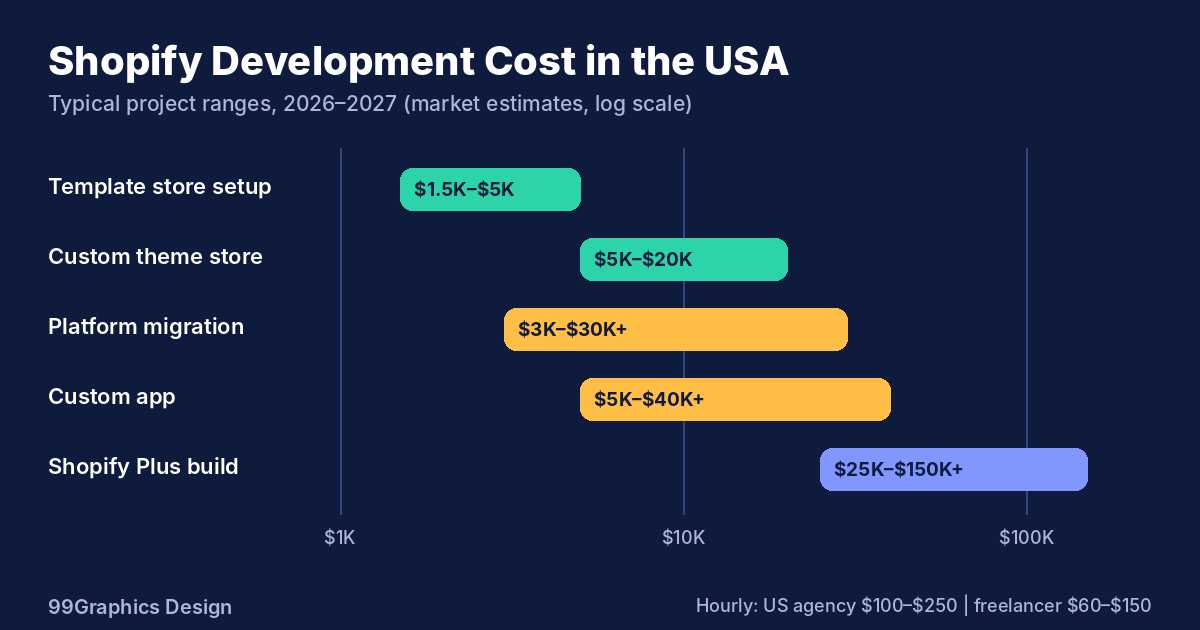
Shopify development cost depends on scope, not page count. These are typical US market ranges.
| Project type | Typical cost range | What it usually includes |
|---|---|---|
| Template store setup | $1,500–$5,000 | Theme setup, branding, product upload, basic apps |
| Custom theme store | $5,000–$20,000 | Custom design, theme build, mobile UX, SEO basics |
| Shopify Plus build | $25,000–$150,000+ | Custom design, plus features, integrations, and checkout work |
| Platform migration | $3,000–$30,000+ | Data transfer, redirects, QA (varies by catalogue size) |
| Custom app | $5,000–$40,000+ | Planning, building, testing, deployment |
| Monthly support | $500–$3,000 | Fixes, updates, small improvements |
What does each budget level buy you?
- Under $5,000: A polished template store. Limited custom design. Few or no integrations.
- $5,000–$20,000: A custom design, a tuned theme, solid mobile UX, and light integrations.
- $25,000 and above: Plus features, deep integrations, custom apps, and checkout logic.
Shopify store setup cost: the quick view
A basic launch on a purchased theme costs far less than a fully custom build. Expect the low end if you have clean product data, ready photos, and no integrations. Costs climb fast once you add custom features, multiple currencies, or a B2B portal.
Shopify developer hourly rate in the USA
Hourly rates vary by location and seniority:
- US agencies: $100–$250 per hour
- US freelancers: $60–$150 per hour
- Offshore or blended teams: $25–$75 per hour
A low rate is not always a low cost. A cheaper developer who needs twice the hours costs more in the end. Compare total project price and scope of work, not the rate alone.
Costs people forget.
- Shopify plan fees. Check Shopify’s current pricing page. Plus carries a much higher monthly fee than standard plans.
- App subscriptions. Many stores spend $50–$500+ per month.
- Content and photography. Product copy and images take real time and budget.
- QA and testing. Skipping it costs more after launch.
- Post-launch support. Every live store needs updates and fixes.
Unique insight: the app bloats maths. Five apps at $60 per month cost $10,800 over three years. They also add JavaScript that slows your store. One custom feature, built once, often costs less over time and loads faster. Ask your developer to compare app cost against a custom build before you commit.
What drives your quote up or down?
- Number of unique page templates
- Custom features and apps
- Integrations with ERP, WMS, or 3PL systems
- Catalogue size and migration complexity
- Markets, currencies, and languages
- Design depth and brand asset readiness
Which Pricing Model Should You Choose?
US agencies price Shopify work in four common ways.
- Fixed price. Best for a clearly defined scope. Watch for change-order fees on anything outside the written scope.
- Time and materials. Flexible for evolving projects. Set a monthly cap and ask for weekly budget reports.
- Monthly retainer. Best for ongoing improvements, CRO tests, and support. Agree on hours and response times up front.
- Dedicated team. Best for enterprise roadmaps and Shopify Plus brands that ship every week.
Practical angle: Use a fixed price for the build and a retainer after launch. This keeps launch costs predictable and growth work flexible.
How Long Does It Take to Develop a Shopify Website?
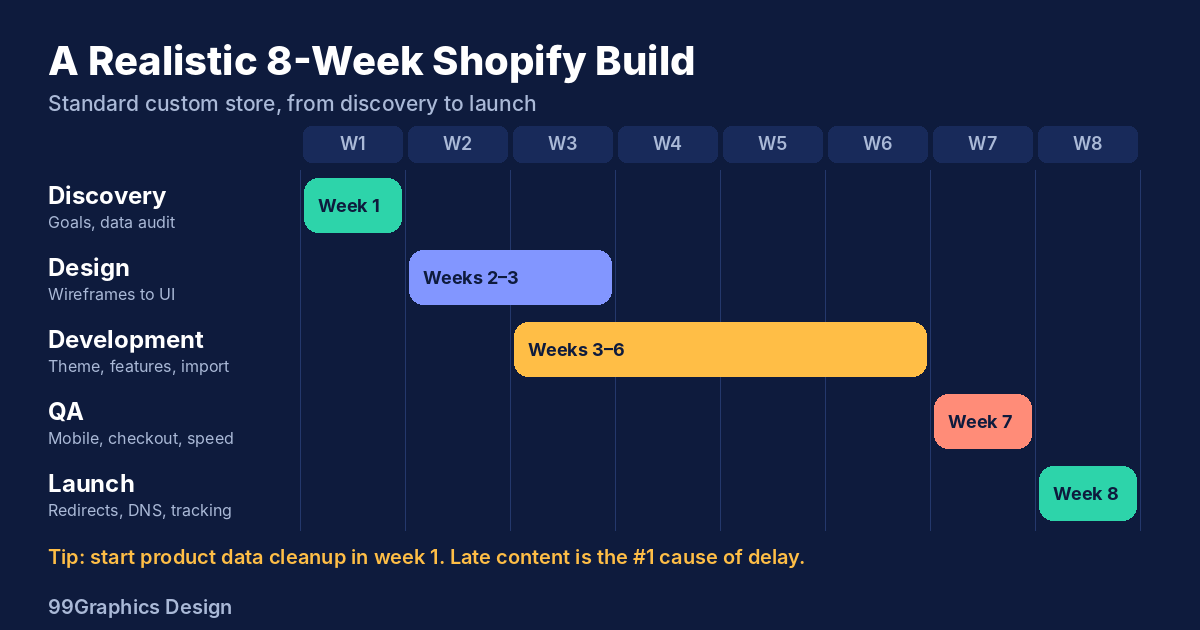
The Shopify development timeline depends on scope. Use these benchmarks.
| Project | Typical timeline |
|---|---|
| Template store | 2–4 weeks |
| Standard custom store | 4–8 weeks |
| Migration plus redesign | 8–14 weeks |
| Shopify Plus with integrations | 12–24 weeks |
| Custom app | 4–12 weeks |
A realistic 8-week build
- Week 1: Discovery. Goals, audit, data review, and integration list.
- Weeks 2–3: Design. Wireframes first, then high-fidelity pages.
- Weeks 3–6: Development. Theme build, features, and data import.
- Week 7: QA. Cross-browser, mobile, checkout, payments, and speed tests.
- Week 8: Launch. Redirects, DNS, analytics, and go-live monitoring.
What causes delays?
- Late product content and images
- Slow feedback loops
- Scope added mid-build
- Unclear integration specs
Practical tip: Start product data cleanup in week one. Content is the most common reason stores launch late. Name one decision-maker who approves designs within 48 hours.
Shopify Expert vs Shopify Agency: Which Is Better?
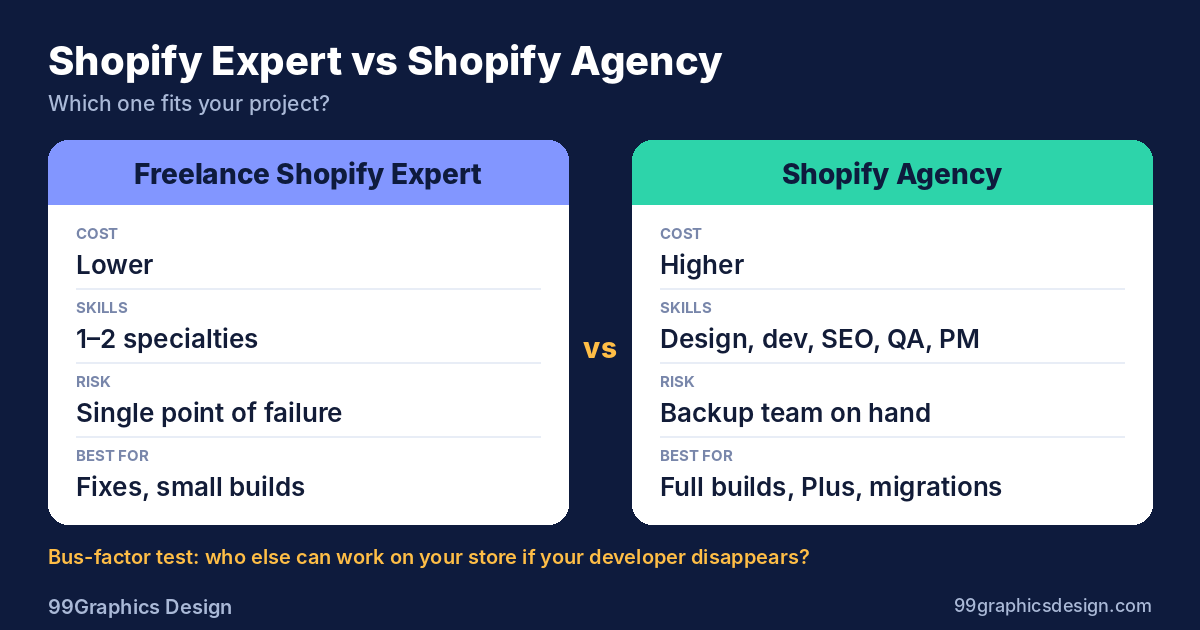
| Factor | Freelance Shopify expert | Shopify agency |
|---|---|---|
| Cost | Lower | Higher |
| Skills | One or two specialities | Design, development, SEO, QA, project management |
| Speed | Fast on small tasks | Faster on large projects |
| Risk | Single point of failure | Backup team |
| Best for | Fixes and small builds | Full builds, plus migrations |
Choose a freelancer when the task is small, clear, and low risk. A theme fix or a single app setup fits well.
Choose an agency when you need several skills at once. A Shopify web development agency assigns a project manager, designer, developer, and QA lead. If one person leaves, your project keeps moving.
The bus-factor test: Ask who else can work in your store if your developer disappears. If the answer is nobody, the risk is yours.
Is Shopify Plus Worth It for US Businesses?
Shopify Plus development suits brands that outgrow standard features.
Consider Plus if you need:
- Checkout customisation beyond standard options
- Multiple shopfronts or expansion stores
- B2B or wholesale features
- Advanced automation and higher API limits
- Dedicated support and launch tools
Stay on a standard plan if your catalogue is simple, your checkout works well, and growth is steady.
Decision rule: Add your current plan cost, your app costs, and the revenue lost to checkout friction. If that total approaches plus pricing, run the numbers on switching. Plus pricing changes, so confirm current terms with Shopify.
Shopify Migration Services: Moving from WooCommerce, Magento, or BigCommerce
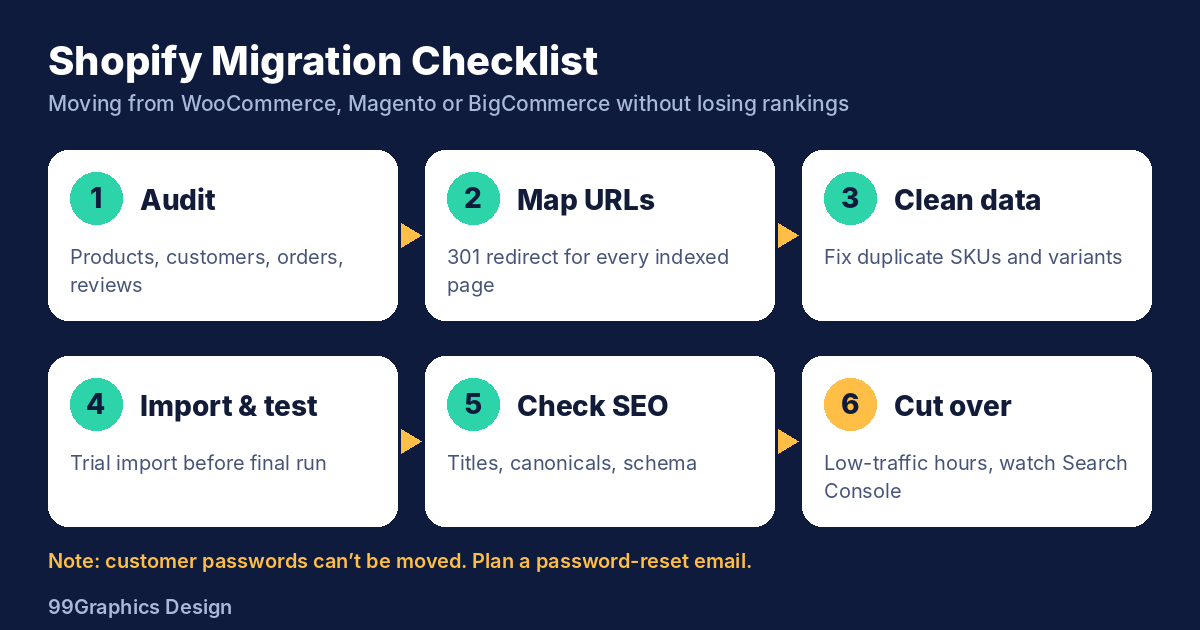
Migration is where stores lose rankings. Plan it like surgery, not copy-and-paste.
Migration checklist:
- Audit the old store: products, variants, customers, orders, reviews, and redirects.
- Map URLs. Create 301 redirects for every indexed page.
- Clean data. Fix duplicate SKUs, broken variants, and missing images.
- Import and test. Run a trial import before the final one.
- Check SEO elements: titles, meta descriptions, canonical tags, and structured data.
- Cut over during low-traffic hours, then watch Search Console for errors.
Platform notes:
- WooCommerce: Plugin-based features often need rebuilding.
- Magento: Expect heavier data mapping for custom attributes and B2B pricing.
- BigCommerce: Usually simpler, but check URL structure and app dependencies.
Customer passwords generally cannot be moved over. Plan a password reset email for returning customers.
Shopify Custom App Development and API Integration
Build a custom app when no existing app fits your workflow, or when app fees and speed costs add up.
Common use cases:
- ERP and inventory sync
- Custom pricing for wholesale accounts
- Subscription and bundle logic
- Order routing to 3PL warehouses
- Product configurators
Shopify API integration best practices:
- Use webhooks instead of polling to save API calls.
- Handle rate limits with queues and retries.
- Log every sync failure and send alerts.
- Keep a staging store for testing.
- Document the data flow so your team can maintain it.
Unique insight: The costliest integration bugs are silent ones, such as orders that never reach your warehouse. Ask for monitoring and failure alerts in the scope of work.
Shopify Theme Customisation, Speed, SEO, and Checkout
Theme customisation and store design
Start with a flexible base theme and extend it. A full rebuild rarely pays off unless your brand needs a truly unique layout. Prioritize the pages that drive revenue: product pages, collection filters, and the mobile cart.
Shopify SEO and speed optimization
Google’s Core Web Vitals targets give you a clear bar: Largest Contentful Paint under 2.5 seconds, Interaction to Next Paint under 200 milliseconds, and Cumulative Layout Shift under 0.1.
Speed fixes that work:
- Remove unused apps and leftover code
- Compress and correctly size images
- Lazy-load below-the-fold media
- Defer non-critical scripts
- Limit custom fonts
SEO basics for Shopify:
- Write unique copy for collection pages
- Add Product and Breadcrumb structured data
- Keep URLs short and clean
- Use canonical tags to handle duplicate variant and collection URLs
- Submit your sitemap in Google Search Console
Shopify checkout customization
Checkout control is limited on standard plans. Plus unlocks deeper options. Use Shopify’s checkout extensibility and Functions for custom discounts, shipping rules, and payment logic. Avoid building on legacy checkout approaches that Shopify is phasing out. Test every change on mobile with real payment methods.
Eight Mistakes to Avoid When Building a Shopify Store
- Choosing on price alone. The lowest quote often leaves out QA, redirects, or integrations.
- Skipping discovery. Unclear scope creates change orders and delays.
- Installing too many apps. Each one adds cost and script weight.
- Designing desktop first. Design for the phone, then scale up.
- Ignoring the redirect map. Missing 301s cost rankings.
- Forgetting analytics. Set up GA4, ad pixels, and conversion events before launch.
- Launching without checkout QA. Test every payment method and shipping rule.
- Having no post-launch plan. Budget for support and testing from day one.
How to Hire Shopify Developers in USA: A Step-by-Step Process
Follow this process to hire Shopify developers USA businesses can trust.
- Define scope. Write down goals, must-have features, integrations, and budget.
- Shortlist three to five partners. Look for Shopify-specific portfolios, not general web work.
- Review live stores. Open them on mobile and check load speed.
- Ask for references from projects similar to yours.
- Request itemized quotes. Compare scope line by line, not just totals.
- Check the contract. Confirm code ownership, support terms, and revision limits.
- Start with a paid discovery phase if the project is large.
Ten questions to ask before you sign
- Have you built stores in my industry?
- Who will actually work on my project?
- How do you handle data migration and redirects?
- What is your QA process?
- How do you measure speed and Core Web Vitals?
- Who owns the code and the theme after launch?
- What does post-launch support cost?
- How do you handle scope changes?
- Can you show results, not just screenshots?
- What is your communication schedule?
Red flags
- No Shopify-specific portfolio
- Vague quotes with no breakdown
- A promise to launch custom work in days
- No staging or QA process
- Heavy reliance on paid apps for every feature
- Refusal to hand over code ownership
Why Choose 99Graphics Design as Your Shopify Development Company in USA

99Graphics Design is a full-service Shopify development company in USA with an office in New York and a team that covers design, development, and digital marketing under one roof.
What you get:
- Shopify store design and development, from UX to launch
- Custom theme work and Shopify Plus builds
- Migration from WooCommerce, Magento, and BigCommerce with SEO protection
- Custom apps and API integrations
- Speed and SEO optimization built into every build
- Post-launch support and growth marketing
Our process:
- Discovery and data audit
- Brand-led design
- Development on a staging store
- QA on real devices
- Launch with monitoring
- Ongoing optimization
Pick your next step
- Launching a new store? Get a free Shopify quote.
- Moving from WooCommerce or Magento? Book a migration consultation.
- Store slow or underperforming? Talk to a Shopify expert.
- Startup moving fast? Schedule a 15-minute call.
- Enterprise on Shopify Plus? Hire a dedicated Shopify team.
Frequently Asked Questions
How much does it cost to build a Shopify store in the USA?
Most US businesses pay $3,000–$20,000 for a custom Shopify store. Template-based setups start near $1,500. Shopify Plus and complex builds range from $25,000 to $150,000 or more. Final cost depends on design depth, features, integrations, and catalog size. Ask for an itemized quote so you can compare partners fairly.
How long does it take to develop a Shopify website?
A template store takes 2–4 weeks. A standard custom store takes 4–8 weeks. Shopify Plus builds and complex migrations take 12–24 weeks. Late content and slow approvals cause most delays, so prepare product data and name one decision-maker early.
How do I hire a Shopify developer?
Define your scope and budget first. Shortlist three to five developers with Shopify-specific portfolios. Review their live stores on mobile, check references, and compare itemized quotes. Confirm code ownership and support terms in the contract before you sign.
Shopify agency vs freelancer: which is better?
Hire a freelancer for small, well-defined tasks like theme fixes or one app setup. Hire an agency for full builds, migrations, Shopify Plus projects, and work that needs design, development, SEO, and QA together. Agencies cost more but reduce the risk of delays and single points of failure.
What does a Shopify development company do?
It designs, builds, and maintains Shopify stores. Services include custom theme development, store design, migration, custom apps, API integrations, speed and SEO optimization, checkout customization, and ongoing support.
Is Shopify Plus worth it for US businesses?
It is worth it when you need checkout customization, multiple storefronts, B2B features, or advanced automation. Compare your current plan, app costs, and checkout-related revenue loss against Plus pricing. If your store is simple and growing steadily, a standard plan is usually enough.
Conclusion: Choose a Partner Who Builds for Revenue
The best Shopify development company in the USA does more than launch a store. It protects your data, your rankings, and your conversion rate from day one. Use the cost ranges, timelines, and vetting questions above to compare partners with confidence.
If you want a clear scope, a fixed quote, and a team that handles design, development, and SEO together, talk to 99Graphics Design. Schedule a 15-minute call and get your free Shopify quote today.
Ready for
Digital Transformation?